
eBanking connection letter
Have your eBanking connection letters ready, one letter contains your identifier and the other provides your initial password.
Download the application
Download the "My Piguet Galland" mobile application for free from the IOS or Android store.
Register your mobile device
Launch the mobile application and follow the instructions to start registering your phone.
- The terms of use must be validated (by scrolling right down) to begin the registration process
- Then click on “Register your phone” :
- Enter your username and password, then click on “Continue”
- Enter the verification code you just received by SMS
- Set your PIN code
Login from your web browser
Your smartphone must be enrolled before you can connect to eBanking from your browser.- Go to your eBanking web portal
- Enter your EB login
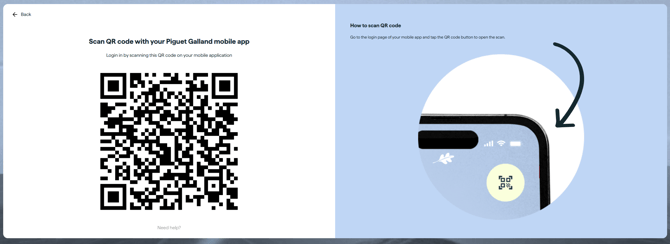
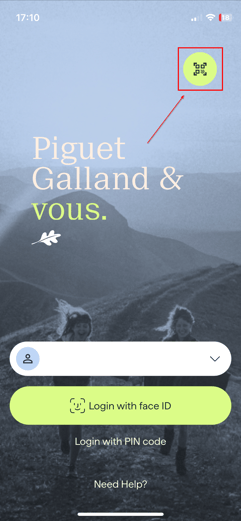
- Scan the QR code using your mobile application
Web view:
Mobile view:
How to log-out correctly from the eBanking?
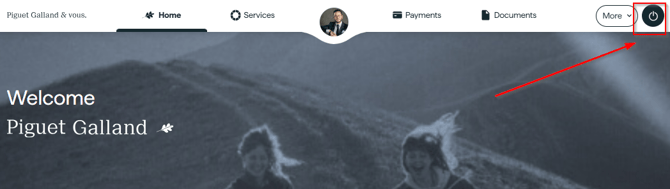
In your browser, the logout button is located at the top right-hand corner of the eBanking screen, and is labelled “Logout”.
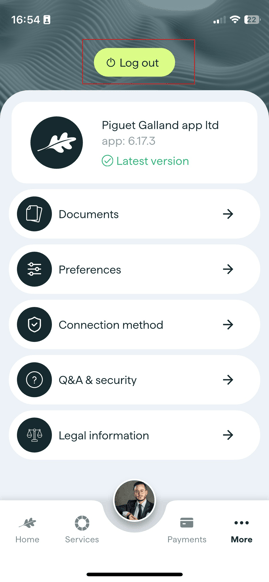
In the mobile application, the logout button is located in the "More" section.
Web version:
Mobile version:
The main features of the My Piguet Galland eBanking app
Overview
On the home page, you'll find an overview of your accounts, as well as news topics.
To get an overview of your accounts, click on the “View my accounts” button.
Contacts
Easily access your privileged contacts at Piguet Galland for personalised support and advice tailored to your needs.
Click on your Advisor's photo to open the contact page.
Photos of the Advisor, Assistant and branch contact will appear in the contact section
Portfolio composition and performance
Find a detailed view of your portfolio with a breakdown of your positions in the various asset classes, graphical representations of performance trends as well as a history of the account movements and documentation relating to this portfolio.
Payments and transfers
View your relationships and portfolios, investment performance and loans at a glance.
Services - Documents
Find out more about the different service offers, as well as the “Services” and “Documents” menus.